


Will using every port simultaneously result in lower Mbps for ethernet, or lower the 5Gbps for the USB-A ports?
No. Each port has its own dedicated power allocation. The only shared power and speeds are between the USB-A ports.
Do I need additional drivers for ethernet functionality?
No, you do not. However, it may require manual driver installation for older systems.
Fixing Ethernet Issues - Windows 10 Users
If you are a Windows user experiencing issues connecting your Ethernet, please try the following steps and see if it resolves the issue:
Check your drivers - The first thing to check is that the correct driver for your Ethernet card is installed on the system.
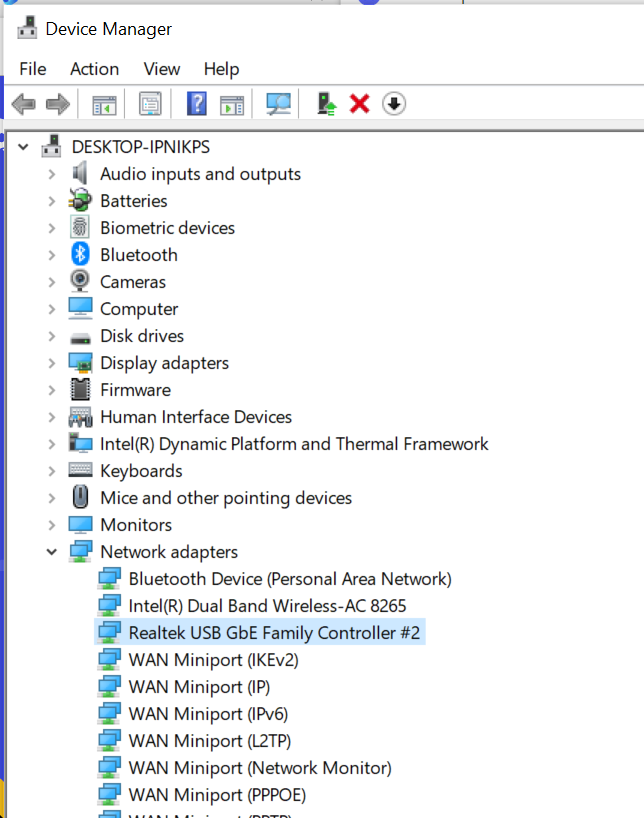
1. To do so, right-click on the Start button and select Device Manager. This will bring up the Device Manager window. Here you can see all the devices installed on the system and their status.

2. Expand the Network adapters list and check whether there are any issues with the devices. Identify the Ethernet card, in our case, it should be under "RealTek USB GbE Family Controller".
3. Right-click on it and select Properties. In the Device status window, it should say that your device is working properly, like in the image below.
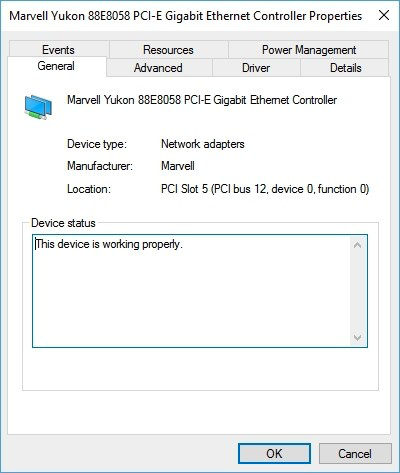
4. If your Ethernet controller icon has a question mark or an exclamation point then I’d recommend reinstalling the correct driver for it. Use the link attached at the end of this message to download the drivers and controllers.
Is the Slim Multi-Port Adapter compatible with the MacBook 2017 12”?
A: We can confirm that this device is indeed compatible with the MacBook (12-inch, 2017). This laptop uses a USB 3.1 Gen 1 port with Mini-DisplayPort Protocol and USB-C PD (Power Delivery), which is a minimum requirement for our adapter to function.
Our hub adapter is, also, compatible with computers and devices that include the USB-C Thunderbolt 3 port.
Does the Slim Multi-Port Adapter work with the Amazon Fire HD 10?
A: We can confirm that the USB-C port on the Fire Tablet is only for charging and connecting to a computer for basic data transfer and unfortunately, will not work with any USB-C hubs.
What speeds does the Ethernet port support?
The ethernet supports the following speeds:
- 10 Mbps
- 100 Mbps (Fast Ethernet)
- 1000 Mbps (Gigabit Ethernet)
NOTE: The network speeds depend upon the cabling, networking equipment, and network traffic.
What devices are the Slim Hub Adapter with Ethernet compatible with?
A: Our Type-C adapters were designed primarily for MacBooks but will be compatible with many Windows PCs. Keep in mind, there are different types of USB-C ports, and that our hub adapter requires either a Type-C USB 3.1 Gen2 port or a Thunderbolt 3 port.
If the USB-C port on your device does not utilize DisplayPort over USB-C with Alternative Mode, the video output on our adapters may not function properly. If the PC does not utilize Power Delivery 2.0 (or 3.0), pass-through charging will not function through our Type-C adapters.
Can I connect another adapter through the USB-C port on the side?
A: No, the USB-C port is designed only for pass-through charging of the computer that is using the adapter. It will not support video output or data transfer.
Will I be able to plug in multiple external HDD/SSD drives into the ports with the USB-C and adapters?
A: When splitting up a USB-C port, it limits the capabilities of all the ports, and although you could plug in one drive, the hub is meant more for lower-powered devices.
We can confirm that the USB-C port on the hub adapter is meant only for power-delivery and will not support data transfer or video output.
If you are able to connect an external drive, we would recommend only connecting it to one of the USB-A ports and to connect only one external hard drive at a time as two will require too high of a power draw from the hub adapter and may not function correctly.
Will this support the Apple USB SuperDrive?
A: Unfortunately, none of our hubs will support the Apple USB SuperDrive. As it turns out, the USB SuperDrive requires a significant amount of power in order for the drive to be powered and read the disk that has been inserted. Feel free to use the following article from Apple Support for reference: (https://support.apple.com/en-us/HT204377)
Does the HDMI port support 4K@60Hz?
A: We can confirm that the HDMI port supports 4K@60Hz when it is connected to the 2019 16-inch MacBook Pro and the 3rd-Generation iPad Pro in both 10.5" and 12". Older and smaller MacBook Pros will support 4K@30Hz.
Have more questions? Submit a request
Related Articles
- Quick Start Guide - USB-C Slim Multi-Port with Ethernet Adapter
- USB-C Slim Multi-Port with Ethernet Adapter ; Setup & Troubleshooting Guide
- Technical Specifications - USB-C Slim Multi-Port with Ethernet Adapter
- Device Compatibility - USB-C Slim Multi-Port with Ethernet Adapter
- Safety and Compliance Documentation - USB-C Slim Multi-Port with Ethernet Adapter
Comments
0 comments
Article is closed for comments.