


Frequently Asked Questions
Does this 7-in-1 USB-C Slim Multiport Adapter with Ethernet get warm during use?
Yes, it's normal for the adapter to become slightly warm during extended use, especially when using multiple ports simultaneously. However, it is designed with aluminum housing for heat dissipation and should not overheat under normal conditions.
Does the HDMI port on the 7-in-1 USB-C Slim Multiport Adapter with Ethernet support audio output?
Yes, the HDMI port transmits both video and audio, so it can be used to send sound to an external monitor, TV, or speaker system.
Can I use the USB-A ports to charge my devices?
The USB-A ports on the 7-in-1 USB-C Slim Multiport Adapter with Ethernet provide data transfer but are not designed for fast charging. They can provide minimal power to small accessories but are not suitable for charging smartphones or tablets.
Does this 7-in-1 USB-C Slim Multiport Adapter with Ethernet work with gaming consoles like the Nintendo Switch?
No, this adapter is not compatible with the Nintendo Switch or other gaming consoles due to power delivery and compatibility limitations.
Will the Ethernet port work if my laptop’s Wi-Fi is enabled when using the 7-in-1 USB-C Slim Multiport Adapter with Ethernet?
Yes, but your computer may default to Wi-Fi. To ensure a stable wired connection, go to your network settings and prioritize Ethernet over Wi-Fi.
Does this adapter support dual external monitors?
No, this 7-in-1 USB-C Slim Multiport Adapter with Ethernet supports only a single external display via the HDMI port. It does not support dual external monitors simultaneously.
What speed is this ethernet adapter capable of?
This adapter will support speeds of 10/100/1000 (Gigabit) Ethernet speeds.
What if I'm experiencing ethernet issues?
We recommend following the provided steps:
1) Disconnect your Multi-Port Adapter from your computer
2) Open up your Network Preferences
3) Manually remove "USB 10/100/1000 LAN" from your Network by clicking the "-" symbol

4) Plug your Multi-Port Adapter back into your computer
5) Manually add "USB 10/100/1000 LAN" to your Network Preferences by clicking the "+" symbol
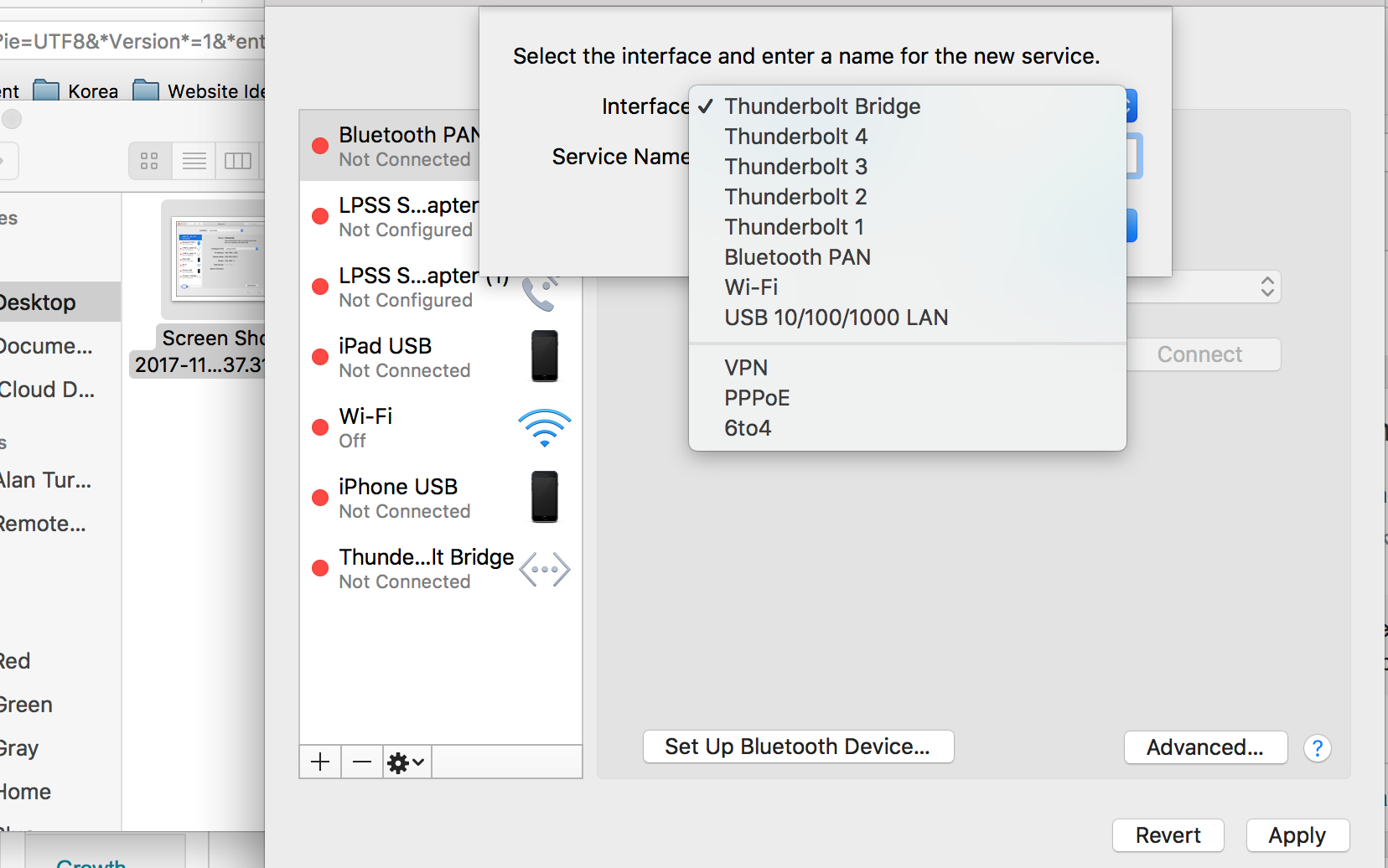
6) After adding your Ethernet back in, please click on the "Advanced" tab
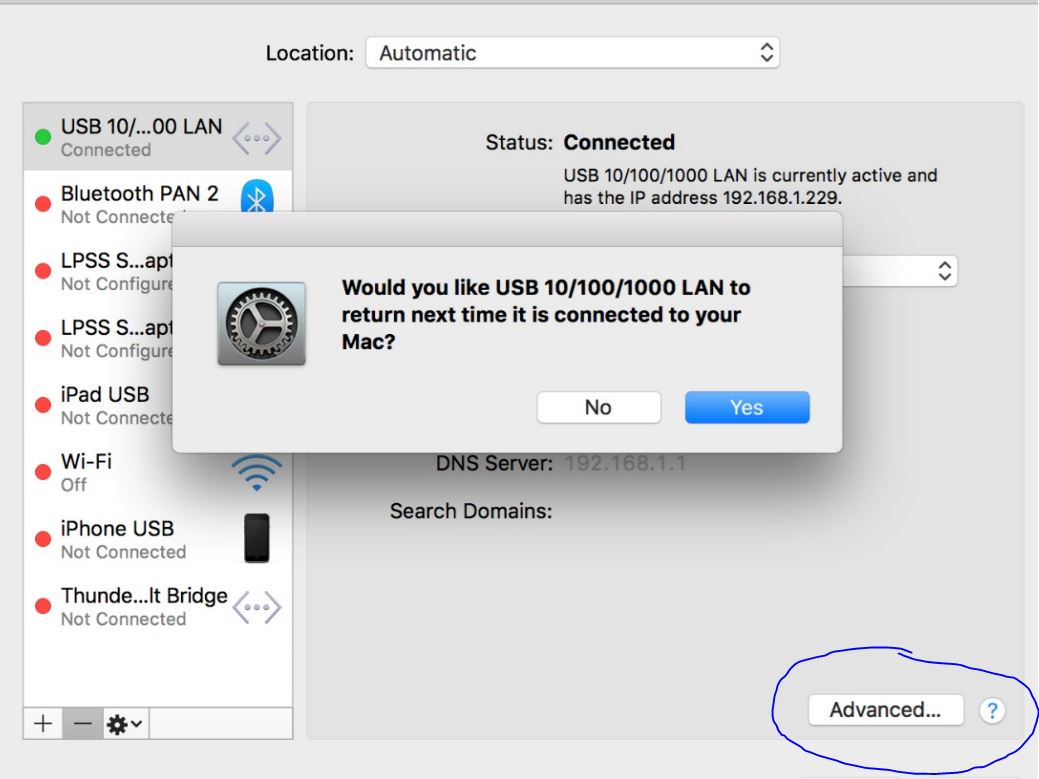
7) In the "Advanced" tab, click on the "Renew DHCP Lease" button
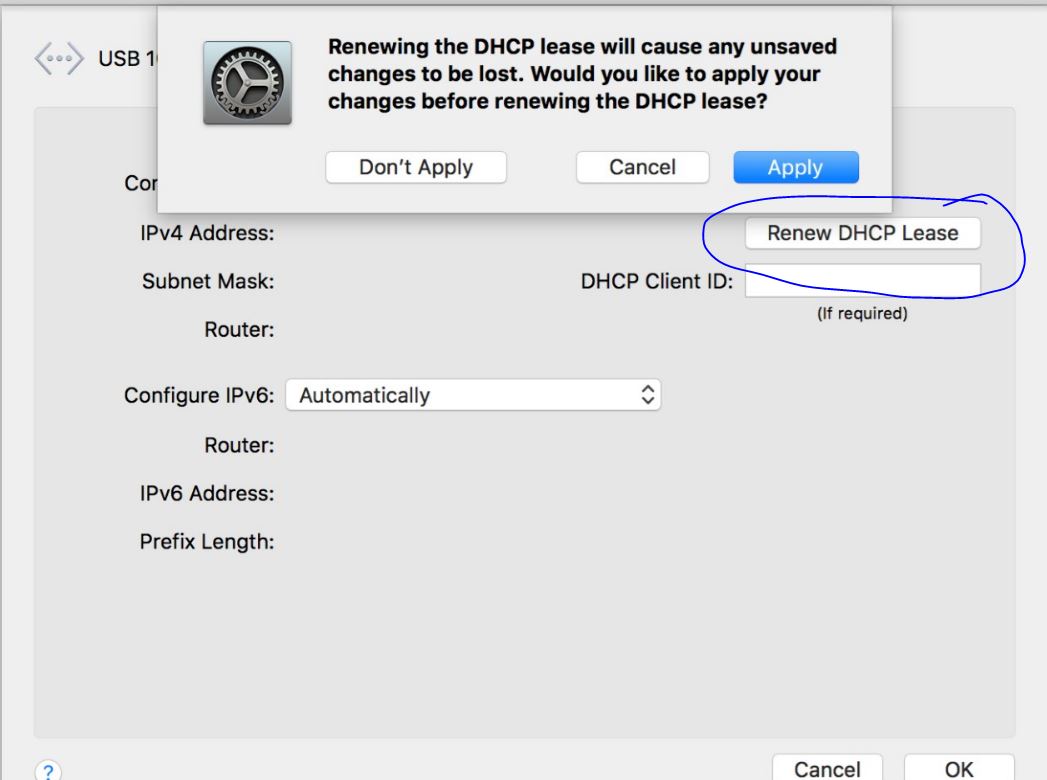
8. Click "OK" and check your Ethernet connection. "USB 10/100/1000 LAN" should be connected now.
Can I connect multiple external HDD/SSD drives into the adapter?
We recommend only connecting one external hard drive at a time, as two will require too high of a power draw from the adapter and may not function properly.
Can the HDMI port support a higher refresh rate than 60Hz at a lower resolution?
The adapter can support 720p @ 120Hz on supported external displays and devices, but a high resolution would reduce the refresh rate to 60Hz.
What wattage can I expect when I connect a 100W charger to the adapter?
When a 100W Charger is connected to the adapter, there would be a 15W diminishment due to providing the adapter with power for operation when connected to your host device.
Charging rates may also vary depending on what charger you are using. For instance: the maximum passthrough charge a GaN Charger could provide is up to 80W, while an Apple Charger could provide up to 74W.
Is the Type-C port only for pass-through charging or can it be used for data as well?
The Type-C port on the adapter is only for pass-through charging and cannot be used data.
Is the Micro/SD card reader compatible with UHS-II?
The Micro/SD card slots on the hub adapter can identify UHS-II cards, but will only support SD 3.0 / UHS-I speeds.
Will Samsung Dex mode work via HDMI 4k 60Hz?
Yes, we can confirm it will support Samsung DeX mode, as long as you have an external display, keyboard, and mouse connected/paired to the hub and/or device.
Does this adapter support multiple monitors with one via HDMI, and USB C?
This adapter only supports one monitor. The USB-C port on the Slim Multiport Adapter is a dedicated USB-C power delivery, which would only help charge the connected host device.
Related Articles
- 7-in-1 USB-C Slim Multiport Adapter with Ethernet - Setup & Troubleshooting Guide
- Internal Troubleshooting - 7-in-1 USB-C Slim Multiport Adapter with Ethernet | ST-P7SM ST-P7SS ST-P7SK
- Quick Start Guide - 7-in-1 USB-C Slim Multiport Adapter with Ethernet | ST-P7SM ST-P7SS ST-P7SK
- Technical Specifications - 7-in-1 USB-C Slim Multiport Adapter with Ethernet | ST-P7SM ST-P7SS ST-P7SK
- Device Compatibility - 7-in-1 USB-C Slim Multiport Adapter with Ethernet | ST-P7SM ST-P7SS ST-P7SK
Comments
0 comments
Article is closed for comments.