


In this article
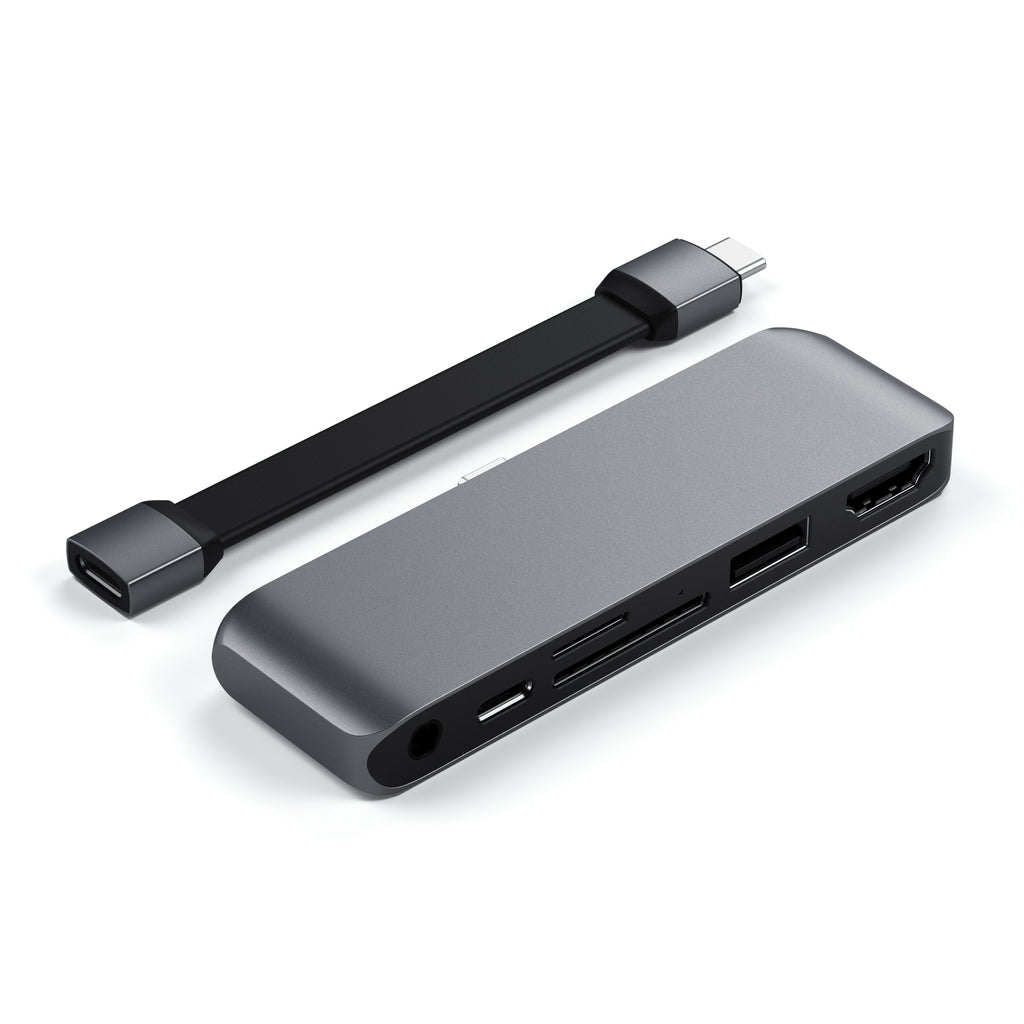
- How long is the included USB-C extension cable?
- Will I be able to use all ports simultaneously?
- Is this also compatible with the MacBook Pro M1?
- Is it compatible with Windows and Android?
- Why is my SD card detected when using my MacBook but not on my iPad?
- What devices can be used through the USB-A ports?
- Does the USB-C port support video output?
- Why is the hub not being detected by my iPad?
- Will I be able to use this with a case on my iPad?
- What transfer speeds do the cards readers support?
- Would this work with the latest 2021 iPad Pro M1?
- What SD cards are supported by the Mobile Pro Hub SD?
- Does the hub adapter support the Apple SuperDrive or other external disc drives?
- Does the Mobile Pro Hub SD support 4K @ 60Hz?
- Does the hub support fast charging on iPad/MacBook Pro?
How long is the included USB-C extension cable?
The cable is approximately 4 inches.
Will I be able to use all ports simultaneously?
Yes, you will be able to use the USB-A, USB-C (pass-through charging), HDMI, 3.5 Aux port, and Micro/SD card slots at the same time.
Is this also compatible with the MacBook Pro M1?
While this hub was designed specifically for the iPad Pro, it will also be compatible with the MacBook Pro M1. USB-C Power Delivery will support up to 60W.
Is it compatible with Windows and Android?
Yes, it is compatible with PC's and other host devices that have a USB-C data port that supports one of the following protocols:
USB 3.1 Gen 2, USB 3.2 Gen 2, USB 3.2 Gen 2x1, USB 3.2 Gen 2x2, Thunderbolt 3, USB4, Thunderbolt 4
DeX mode works with Samsung devices.
Why is my SD card detected when using my MacBook but not on my iPad?
When using an iPad, you will need to open the native "Files" application on your iPad to access external drives, SD, or microSD cards.
1. Connect the Mobile Pro Hub SD to your iPad and insert your USB drive, SD, or microSD card.
2. On your iPad, open the Files app. If you don't see the blue Files app icon on your Home Screen simply swipe down, then search for the "Files"
3. Now you will be access your files
What devices can be used through the USB-A ports?
We can confirm that you are able to use external hard drives, flash drives, and peripherals such as wired keyboards and mice. (USB 3.0, supports up to 3.5W)
Does the USB-C port support video output?
The Type-C port on the Mobile Pro Hub SD adapter was designed specifically for power delivery and will not support data transfer or video output. Because of this, we highly recommend connecting your host device's USB-C charging cable to the hub to allow your device to continue charging while still using the hub.
Why is the hub not being detected by my iPad?
If the Mobile Pro Hub is not being detected by your iPad, we recommend ensuring that the hub is being inserted into the USB-C port all the way. If you are using a case with your iPad, we suggest using the included extension cable.
If you are still experiencing issues, it is also best to complete a reset of your iPad by doing the following:
- Press and quickly release the volume button nearest to the top button.
- Press and quickly release the volume button farthest from the top button.
- Press and hold the top button.
- When the Apple logo appears, release the top button.
Feel free to submit a support request if the reset does not work.
Will I be able to use this with a case on my iPad?
As it turns out, we recommend using the included extension cable when using a case on your iPad as some cases may interfere with the overall functionality of the hub.
What transfer speeds do the cards readers support?
We can confirm that the cards support UHS-I transfer speeds, which have a maximum theoretical speed of 104 MB/s.
Would this work with the latest 2021 iPad Pro M1?
Yes, the 12-inch iPad Pro M1, 11-inch iPad Pro M1, and M1 iPad Air are all compatible with the Mobile Pro Hub SD.
What SD cards are supported by the Mobile Pro Hub SD?
The MicroSD and SD card slots support UHS-I read/write speeds. UHS-II cards can be read but will max out at UHS-I speeds. You may insert card into each slot as they can be read simultaneously.
Does the hub adapter support the Apple SuperDrive or other external disc drives?
Unfortunately, the SuperDrive has a high minimum power requirement which is not supported through the USB-A port on the Mobile Pro Hub SD. The following cable adapter will allow you to directly connect your external disc drive to your host computer: (USB-C to USB 3.0 Adapter Cable).
Does the Mobile Pro Hub SD support 4K @ 60Hz?
Yes, the HDMI port supports 4K@60Hz. Even at lower resolutions, the maximum refresh rate is 60Hz and requires a direct HDMI cable connection. You may have to ensure that the settings on your device are matching the output of the display.
Does the hub support fast charging on iPad/MacBook Pro?
The maximum wattage output is 60W, which is close but not equivalent to fast-charging (67W).
Comments
0 comments
Article is closed for comments.