


In this article
- Will this work with older MacBooks?
- Is this hub is compatible with the Microsoft Surface Laptop Studio?
- Why is there no sound coming out of the audio port when I connect my headphones?
- Does this support High Impedance Headphones?
- Do both USB-C ports support pass-through charging and video output?
- What is the refresh rate when connecting a monitor to the USB-C port next to the pins?
Will this work with older MacBooks?
Although the Pro Hub Mini was designed for the MacBook Pro (14-inch, M1 Pro/Max, 2021) and the MacBook Pro (16-inch, M1 Pro/Max, 2021), it technically is still compatible with MacBooks from 2016 and above that have two Thunderbolt 3 ports or more.
The headphone jack support on the side of the hub can only be used with the MacBook Pro (14-inch, M1 Pro/Max, 2021) and the MacBook Pro (16-inch, M1 Pro/Max, 2021).
Is this hub is compatible with the Microsoft Surface Laptop Studio?
This laptop is equipped with a USB 3.1 gen 1 port, it will technically be compatible, however, the spacing was designed to fit a MacBook, therefore, we would not recommend using it with the Surface Laptop studio.
Why is there no sound coming out of the audio port when I connect my headphones?
We can confirm that the 3.5mm plastic piece is not functioning and is meant to allow the hub to have a more secured hold onto your M1 Pro/Max MacBook laptop. This piece would not be used when the hub is connecting to a different model MacBook such as the 2020 M1 Pro/Air.
Before moving forward, could you please confirm that you've changed your audio source in System Settings?
You can use these steps to ensure audio is recognized through your Pro Hub Mini:
1. Open System Settings2. Select Sound, then Output
3. Ensure General USB Audio Device is selected as shown below: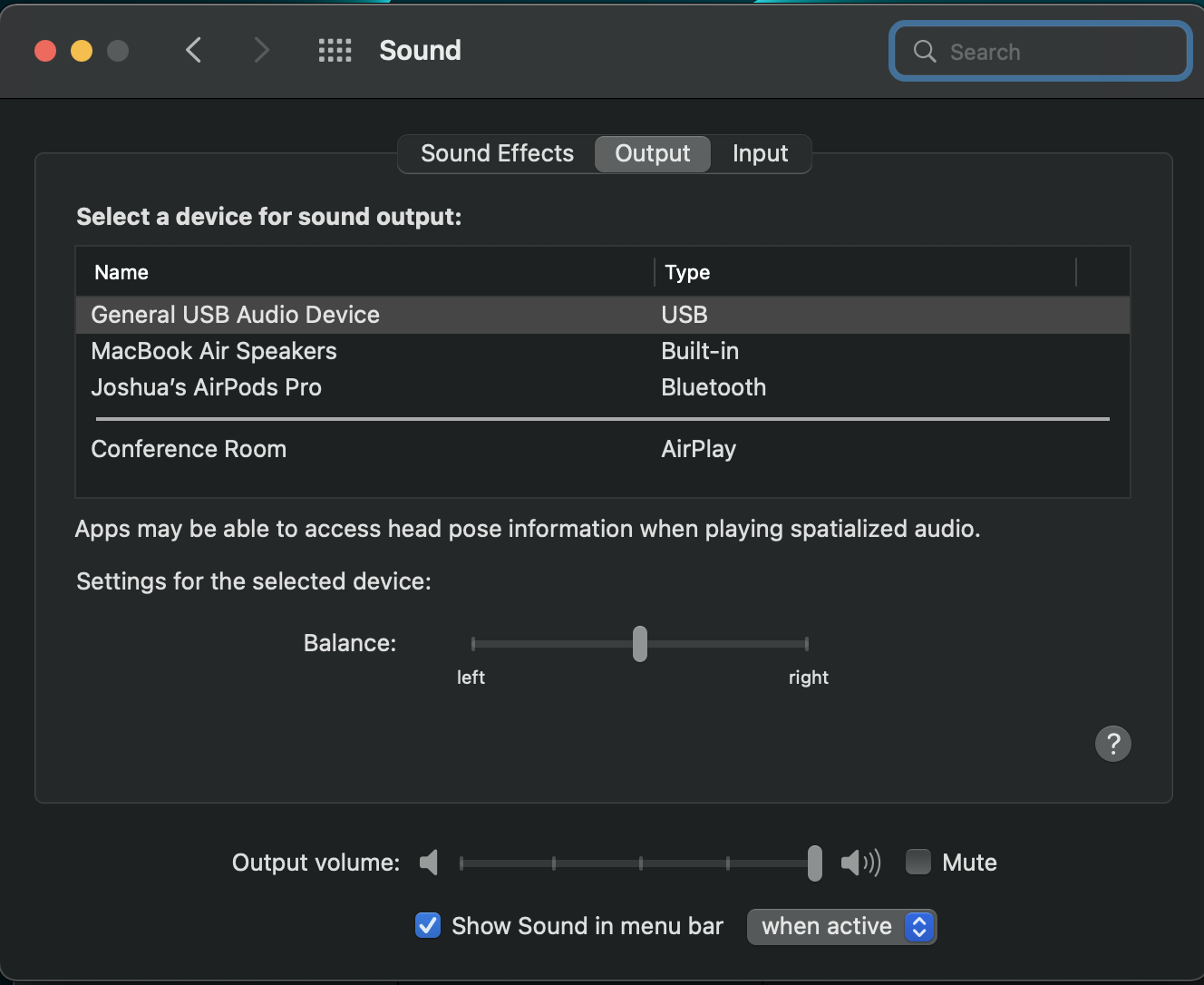
Does this support High Impedance Headphones?
The audio port on the Pro Hub Mini does not support High Impedance Headphones.
Do both USB-C ports support pass-through charging and video output?
We can confirm that only the USB-C port next to the connection pins supports pass-through charging and video output.
The USB-C port near the 3.5mm headphone jack was designed for data transfer purposes only and will not allow for pass-through charging or video output.
We hope this information has been able to provide a bit of clarification and guidance.
Please feel free to reach out to us if you were to have any inquiries!
What is the refresh rate when connecting a monitor to the USB-C port next to the pins?
We can kindly confirm the following information upon testing:
- Supports 4K at 60Hz when connected to an HDMI to USB-C cable.
- Supports 6K at 60HZ when connected to a Thunderbolt cable.
If your monitor is not reading the 60Hz refresh rate, you may need to manually adjust this in your System Settings > Display > Refresh Rate.
We hope this information has been able to provide a bit of clarification and guidance.
Please feel free to reach out to us if you were to have any inquiries!
Have more questions? Submit a request
Comments
0 comments
Article is closed for comments.