


Product Pro Hub Max | ST-UCPHMXM ST-UCPHMXS
Why does my battery drain when I have this plugged into my device?
The Pro Hub Max is BUS-powered using 5W. Even with none of the ports in use, it will still consume computer battery.
Do I need to install any drivers to use the Pro Hub Max?
The Pro Hub Max is generally plug-and-play, but for optimal performance, you may need to ensure your system's drivers are up to date dependent on your system.
What is the speed of the Ethernet port on the Pro Hub Max?
The Ethernet port on the Pro Hub Max supports Gigabit speeds.
Can I use the USB-A 3.0 port on the Pro Hub Max to charge devices?
No, the USB-A 3.0 port on the Pro Hub Max does not support charging.
What is the maximum resolution and refresh rate supported by the HDMI port on the Pro Hub Max?
The HDMI port on the Pro Hub Max supports up to 4K resolution at 60Hz.
What is the maximum display resolution and refresh rate supported by the USB4 port on the Pro Hub Max?
The USB4 port on the Pro Hub Max supports up to a 6K resolution at 60Hz.
What are the capabilities of the USB4 port on the Pro Hub Max?
The USB4 port supports up to 96W charging, up to 6K 60Hz display output, and up to 40 Gbps data transfer.
Is it compatible with the Microsoft Surface Laptop Studio?
The Microsoft Surface Laptop Studio is equipped with a USB 3.1 Gen 1 port, it will technically be compatible, however the spacing was designed to fit a MacBook therefore we would not recommend using it with the Surface Laptop Studio.
Does this hub support Power delivery when I connect my monitor via USB-C?
Yes. When you connect your monitor to the USB4 port of the Pro Hub Max, it will output video as well as charge the laptop if the monitor and cable also support power delivery.
No sound coming out of the audio port when I connect my headphones.
We can confirm that the 3.5mm plastic piece is not functioning and is meant to allow the hub to have a more secured hold onto your M1 Pro/Max MacBook laptop. This piece would not be used when the hub is connecting to a different model MacBook such as the 2020 M1 Pro/Air.
Before moving forward, could you please confirm that you've changed your audio source in System Settings?
You can use these steps to ensure audio is recognized through your Pro Hub Max:
1. Open System Settings2. Select Sound, then Output
3. Ensure General USB Audio Device is selected as shown below: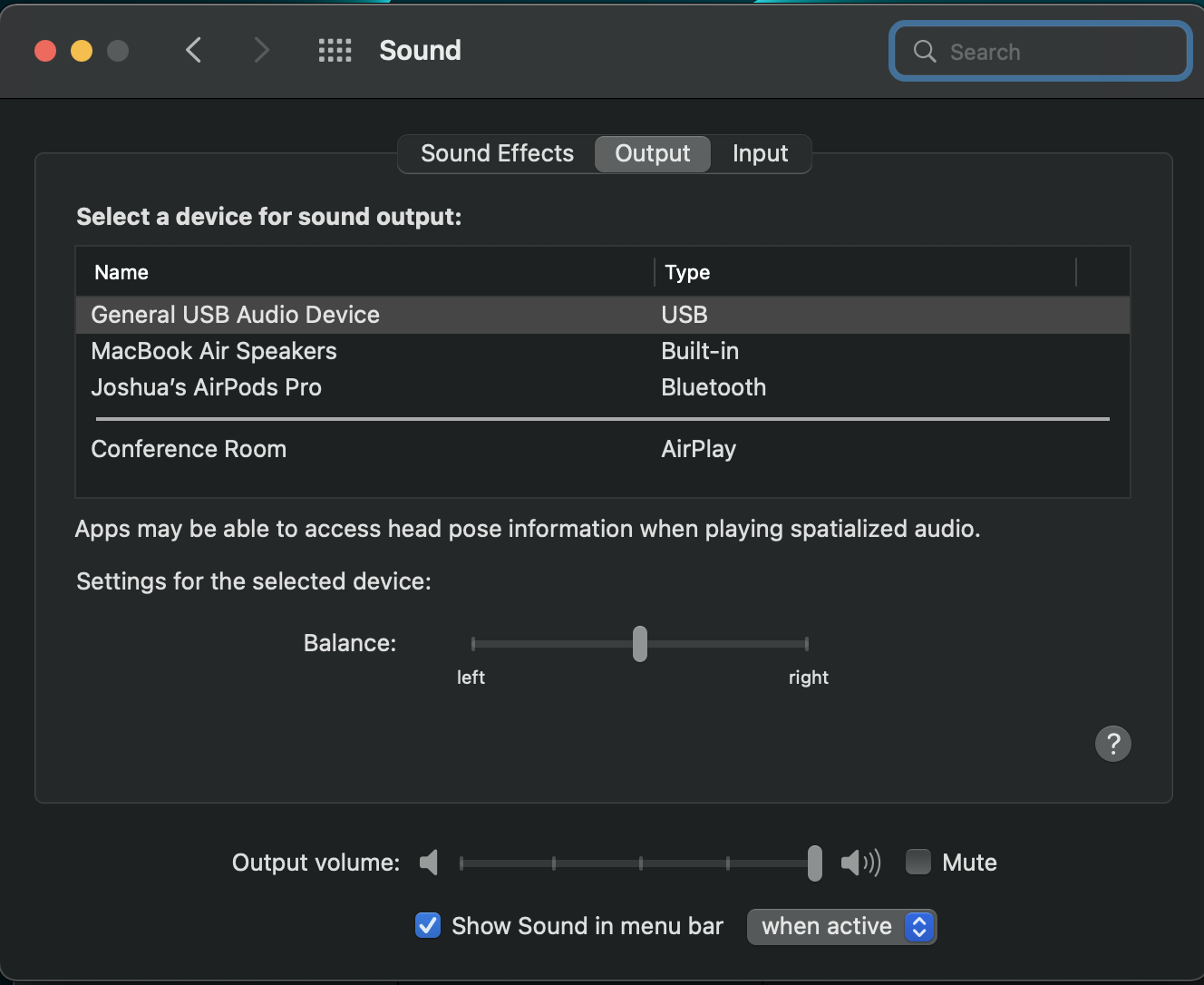
Does this support High Impedance Headphones?
The audio port on the Pro Hub Mini does not support High Impedance Headphones.
Comments
0 comments
Article is closed for comments.