


Overview
My ethernet is not being detected, are there any drivers or software needed before being able to use this adapter for macOS?
Drivers are not required when using this device with a macOS computer. If you are experiencing issues with Ethernet connectivity, please ensure that the “USB 10/100/1G/2.5G LAN” interface is available in your Network settings under System Settings.
Also, we suggest resetting your cable modem and router to reestablish the Ethernet connection to the adapter.
USB4 Multiport Adapter issue with "Ask Every Time" USB/TB4 security setting on a Mac laptop with Apple silicon
Satechi USB/Thunderbolt 4 Security FAQ: "Ask for New Accessories"
Q1: Is setting the USB or Thunderbolt 4 security option to "Ask for new accessories" a security risk?
A1: No, there are no security concerns when setting the option to "Ask for new accessories." This security choice offers users an additional layer of control over their device's connectivity. It consists of four levels, each designed to cater to different user preferences and security needs.
Q2: What are the four levels of the "Ask for new accessories" security option?
A2: The "Ask for new accessories" security option has four levels:
1. **Ask Every Time**: This level prompts for permission every time a new accessory is connected, ensuring the highest level of security but requiring constant user input.
2. **Ask for New Accessories**: With this level, users are prompted to allow new accessories once. Devices that have been allowed are considered safe and won't require further permission. This setting strikes a balance between security and convenience.
3. **Allow Immediately upon Unlocking**: This level allows new accessories to run immediately after unlocking the computer. While convenient, it has a relatively lower security level.
4. **Allow Unconditionally**: Devices are allowed to run without any prompts or conditions. This setting offers the least level of security and is recommended only for advanced users who understand the potential risks.
Q3: Are the "Ask for new accessories" settings available for all MacBooks?
A3: No, the "Ask for new accessories" setting is available only for the M1/M2 series MacBooks. It was introduced with the macOS Ventura 13 system version upgrade. Earlier versions of the macOS system did not include this option. Additionally, the Intel version of MacBooks doesn't have this new accessory setting.
Why can’t I hear audio through my headphones when connecting to the aux port?
You will need to change your audio source in system preferences.
You can use these steps to ensure audio is recognized through your USB4 Multiport and 3.5mm Headphones.
1. Open System Settings
2. Select Sound, then Output
3. Ensure General USB Audio Device is selected as shown below: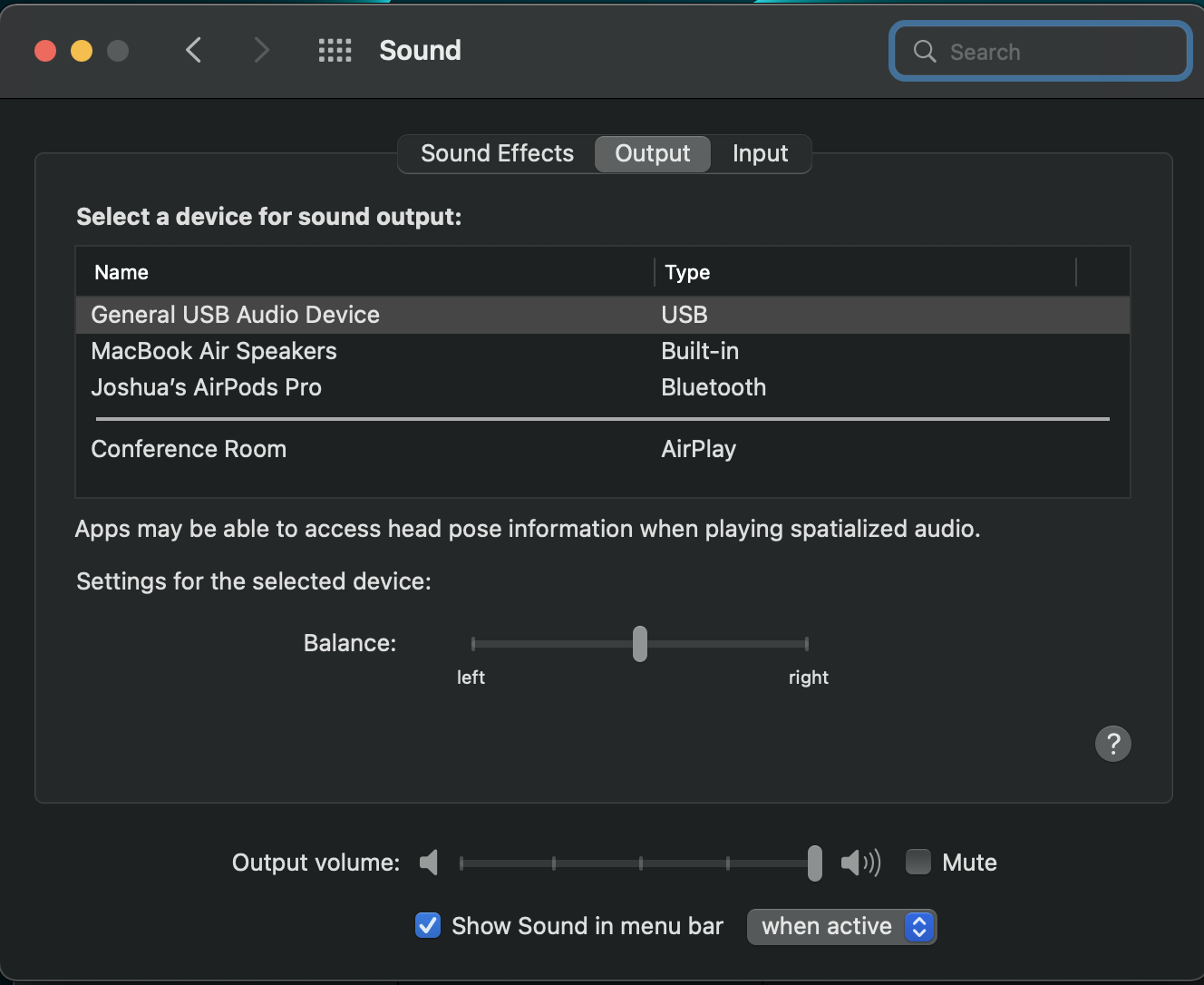
Can I connect two USB-C SSD in parallel?
For optimum performance, we recommend using 1 drive at a time.
Will a Combo Wireless dongle for my mouse and keyboard work with this adapter?
We can confirm that a combo wireless dongle for your mouse and keyboard will be compatible with the USB-4 Multiport W2.5G Ethernet Adapter.
My display is not scaled correctly when connecting to my Samsung TV via HDMI, how can I adjust display settings?
On your Mac, open System Settings > Displays > then click Display Settings.
Select the Display > Resolution > Default for Display > then select "Scaled"
Here you will be able to adjust your display settings based on your preference.
Can I run 2 external displays when connecting to the HDMI and to one of the USB-C ports?
Only the HDMI port on the adapter supports video output.
The left USB-C port supports 10Gbps Data Transfers
The right USB-C port (indicated with a lightning icon) supports 100W PD charging and also 10Gbps Data Transfers
How long is the connecting cable?
The USB4 Multiport adapter's USB-C cable length is 7 3/4" long.
What are some examples of supported USB-A devices?
The USB data port will support up to 10Gbps transfer speeds.
Flash drives, external hard drives, or peripherals like a mouse or keyboard are supported.
Will the USB-A and USB-C ports support USB Webcams and Microphones?
Although, the USB-A and USB-C ports are designed for Data Transfer, we can confirm that it will also support USB Webcams and Microphones.
What are some examples of supported USB-C devices?
USB-C 3.2 PD port supports up to 100W pass-through charging / devices with USB PD protocol 2.0 and higher.
USB-C 3.2 ; up to 10Gbps which supports flash drives, external hard drives, or peripherals like a mouse or keyboard are supported.
Will you be releasing different color variants?
As of right now, we will only be releasing the USB-4 Multiport in Space Grey.
My adapter is running a little warm, what are the standard operating temperatures for this adapter?
Our standard operating temperatures are 86-122° Fahrenheit (30-50° Celsius). Rest assured, this is normal and will not affect the functionality of the device, nor damage any hardware. Our hub adapters are BUS-powered and include active chipsets that will power themselves once connected to your computer. Yes, the adapters will get warm when plugged into the computer, even with nothing plugged into the ports of the adapter.
Is this also compatible with Windows devices?
We designed our Type-C adapters primarily for Apple devices with Thunderbolt ports however, if your Windows PC includes a USB 3.1 gen 1 or 2 port that, also, utilizes DisplayPort over USB-C with Alternative Mode (Type-C pins) then this will be compatible.
Also, if the PC utilizes USB-C Power Delivery protocol (2.0 or higher) then you can charge the PC through the pass-through power port of our adapter.
Will I be able to use this with my iPad Pro?
We have tested and confirmed that the USB4 Hub Adapter with 2.5G Ethernet is compatible with the iPad Pro via USB-C connection. Keep in mind that there will be a slight power diminishment with the pass-through charging so you may need a power adapter with higher wattage to make up the difference and charge the device through the adapter.
The Ethernet section in the Settings app will appear if the iPad is connected to the hub with an Ethernet cable. The iPad's screen will be mirrored when connected to an external display via HDMI and will have the same aspect ratio/resolution as the iPad's. Only certain applications will support the full-screen resolution to an external display such as Netflix, VLC media player, and Powerpoint, among others.
Will I be able to use this with my Mac Studio 2022?
Yes, we can confirm that it is compatible with the Mac Studio 2022.
Comments
0 comments
Article is closed for comments.